

Prime costs, provisional sums, and contingencies are allowances for work or materials that have not yet been finalised or priced. They are entered on the Prime Costs Etc tab of the summary table and are added on top of your marked-up project total, sitting alongside your preliminary costs to produce the gross contract cost.
Accessing the Prime Costs Etc tab
- 1
Open your project and navigate to the Summary Table (stage 5).
- 2
Click the Prime Costs Etc tab along the top of the summary table. It sits between the Summary Table tab and the Preliminaries tab.
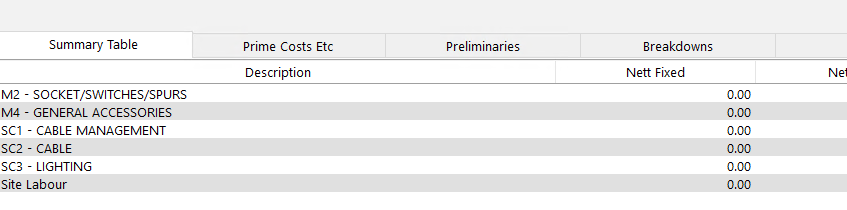
The tab displays a list of descriptions with an amount column on the right. It is divided into three areas: prime costs, provisional sums, and contingencies.
Prime costs
A prime cost is an allowance for materials or work where the actual cost is not yet known at the time of tendering. You include an estimated amount so the overall tender reflects a realistic figure, and the final cost is adjusted once the actual expenditure is confirmed.
Typical examples include:
- Specialist equipment that has not yet been specified
- Materials subject to client selection (such as light fittings or sanitary ware)
- Work to be carried out by a nominated subcontractor whose quotation is pending
To add a prime cost, overtype the description to match your project requirements and enter the estimated amount in the column on the right.
Importing prime costs from takeoff
If you added prime costs as free-type items during the takeoff stage, they will already appear on the Prime Costs Etc tab when you reach the summary table. The free-type button on the takeoff screen includes a category option that lets you designate an item as a prime cost or provisional sum. When the job is calculated through to the summary table, these items are automatically placed on this tab.
Using the free-type route during takeoff is a convenient way to capture prime costs as you work through the drawings, rather than having to remember them all at the summary table stage. The description, quantity, and value you entered during takeoff will carry through.
Provisional sums
A provisional sum is an amount set aside for work that may or may not be required, or for work that cannot be fully defined at the time of tender. Unlike prime costs, which cover items you know will be needed but whose price is uncertain, provisional sums cover items whose scope may change or that may not proceed at all.
Common examples include:
- Builder's work in connection with services
- Making good after other trades
- Attendance on statutory authorities
- Work that depends on site conditions not yet surveyed
Enter a description and the amount in the same way as prime costs.
Contingencies
A contingency is a general allowance for unforeseen costs that may arise during the project. It acts as a financial buffer and is typically expressed as a lump sum.
Enter the contingency amount on the relevant line of the Prime Costs Etc tab. It is added to the prime costs and provisional sums total.
Overtyping descriptions
The descriptions on the Prime Costs Etc tab can be freely overtyped to suit each project. Simply click on any description and type your own text. This change applies only to the current job.
Unlike the Preliminaries tab, the Prime Costs Etc tab does not have a separate master defaults editor. The descriptions you see are starting defaults, and any changes you make are specific to the project you are working on.
How prime costs and provisional sums appear in totals
On the main summary table view, the Totals panel on the right shows a Prime Costs and Provisional Sums line. This is the combined total of all prime costs, provisional sums, and contingencies entered on the Prime Costs Etc tab.
The totals panel reads from top to bottom as follows:
- General Overhead -- percentage applied to the accumulated cost
- Profit -- percentage applied after overhead
- Builders Discount -- main contractor's discount
- Net Contract Cost -- the subtotal after overhead, profit, and discount
- Preliminaries -- the total of all fixed, time-related, and percentage prelim items
- Prime Costs and Provisional Sums -- the total from the Prime Costs Etc tab
- Gross Contract Cost -- the final tender figure including everything above
The gross contract cost is the figure that appears on your tender summary and represents the total price presented to the client.
Prime costs and provisional sums are added after overhead and profit have been calculated. They are not marked up by the general overhead or profit percentages. If you need to include an element of overhead or profit on these allowances, factor it into the amounts you enter.
Next steps
- Preliminary costs -- add fixed, time-related, and percentage preliminary costs.
- Using the summary table -- review the overall layout and cost-to-sell path.
- Overhead and profit -- apply general overhead and profit percentages.
- Builders discount -- apply builders discount as a fraction or percentage.
- Inflation column -- adjust base costs for volatile prices and labour rounding.